The group information opens when you select a device on the Groups page. Detailed information about the selected group is displayed here.
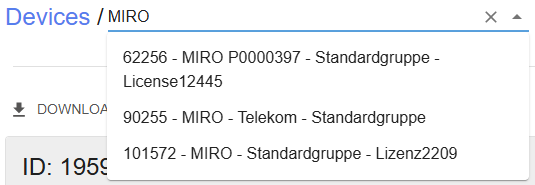
The group shown here can be selected using the dropdown list Groups. The selection can be narrowed down by entering a search string. |
|
The timestamp indicates the last update of the device list in the table. A click on updates the list. |
|
New groups can be added using the + Add group button. This opens the respective dialog. |
|

A click on Delete group deletes this group from the icom Connectivity Suite - VPN.
The group information are distributed across various fields and depend on the device type.
Group properties
The most important properties of this group are listed in the Group Properties field.
The name of this group is displayed under Name; it can be changed by clicking on .
The Internal connection column shows whether connections between the devices in this group are Allowed or Denied; this setting can be changed by clicking on .
The Networks column shows how many different networks are included in this group.
Communication with other groups
The Communication with other groups field shows all information regarding the communication rules of this group.
The + Insert group button can be used to add existing groups to this group’s group connections. The group(s) added are included without any restrictions. The group connections can then be restricted as required.
The table of group connections contains the following columns, depending on the configuration of the visible columns:
The name of this group is displayed under This group; communication between this group and the corresponding other group is defined in this group connection rule.
The Direction column shows the communication direction for this group connection rule:
Bidirectional: this group connection rule applies both to communication from this group to the other group and to communication from the other group to this group.
Unidirectional: this group connection rule applies to communication from this group to the other group.
Unidirectional: this group connection rule applies to communication from the other group to this group.
The Protocol column shows all the protocols permitted by this group connection rule.
The IP addresses column displays all the IP addresses permitted by this group connection rule.
The Ports/Ranges column displays all the ports and port ranges permitted by this group connection rule.
The Actions column permits to edit ( ) or delete ( ) this group connection rule.
Activities
All activities, i.e. changes related to this group, are listed in the Activities field. For details in the table refer to Activities.
The visible columns of the list can be set by a click on COLUMNS. A FILTER enables to filter the list for the desired content. Changes to columns and applied filters will be reset the next time the page is loaded.
EXPORT allows to export the visible content of the list after applying the filters to a CSV file (saved in the browser's download directory) or to print it. The name of the CSV file contains the time at which the data was generated and does not necessarily correspond to the time of export.